Java Mail API Mastery: Sending and Receiving Emails in Your Java Applications

I'm Dhanjeet Kumar Thakur, a dedicated backend developer skilled in Core Java, Spring frameworks, Hibernate, and web tech like HTML, CSS, and JavaScript. With a sharp eye for detail, I create strong backend solutions for seamless user experiences. Git and GitHub are my allies for effective collaboration and code integrity. Always learning, I'm on a mission to elevate my skills and make an impact in Java backend development.
As a backend Java Developer, I've always been curious about how to implement a feature that sends an OTP to a registered email address when users click on the 'forgot password' link. This curiosity led me to discover something called the Java Mail API. This entire blog will be dedicated to the Java Mail API, where we'll explore what it is, and how it works, and, at each step, I will provide code examples.
Introduction of Java Mail API:
Java Mail is an API that is used to compose, write and read emails(Electronic Messages). To work with Java Mail API we need mainly two jar files i.e. mail.jar and activation.jar or one maven dependency i.e. jakarta.mail dependency in the Maven project. For dependency make sure the group id is com.sun.mail.
Before we jump into code you need to understand some of the most common and important protocols like SMTP, POP, MIME, IMAP etc. We are going to use SMTP for sending emails, and POP for reading emails from Inbox.
SMTP( Simple Mail Transfer Protocol)
SMTP is a mechanism to deliver the email. To use an SMTP server with the host provider, authentication is required for sending and receiving emails.
MIME( Multiple Internet Mail Extension)
MIME tells the browser about what is being sent eg. text message, Text message attached with a file basically the format of the message.
POP(Post Office Protocol)
POP is a mechanism to receive mail it provides support for a single mailbox for each user.
Before we jump into code there are a few important stepup needs to be done at the Google account. This is a very important step in terms of sending mail with Authentication.
Setup at the Google Account:
Step 1: Go to Google account from the browser.
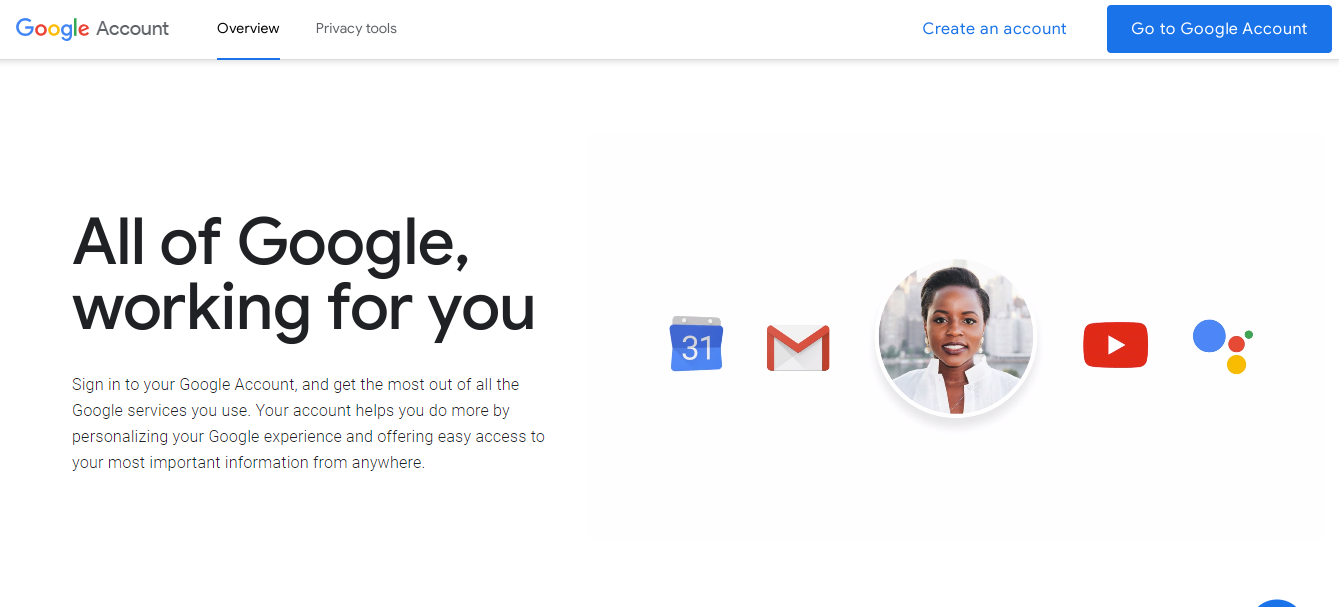
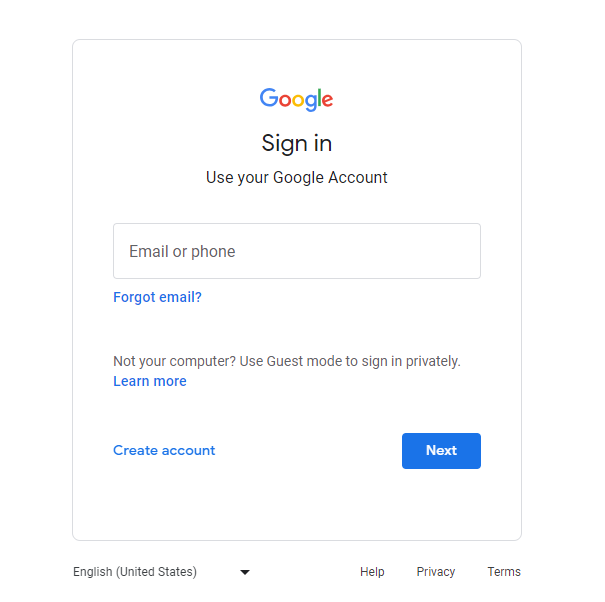
Step 2: Login into your account.
Step 3: Go to the Security section and initially enable 2-Step Verification; it will be turned off by default.
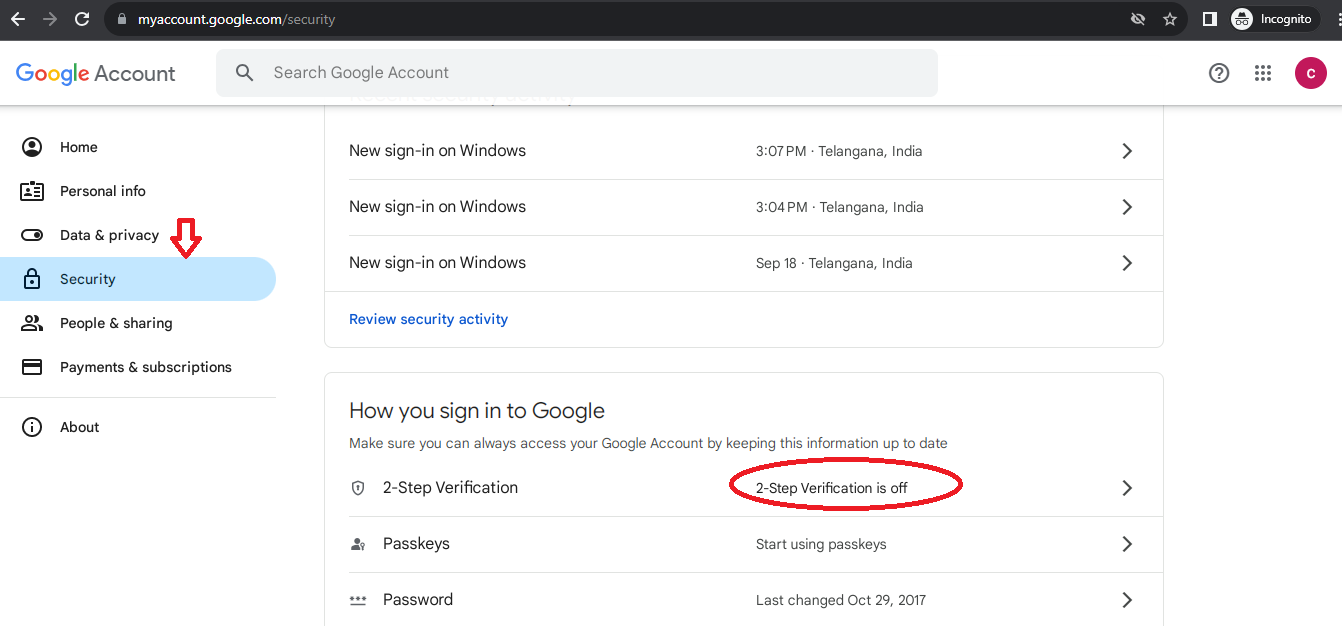

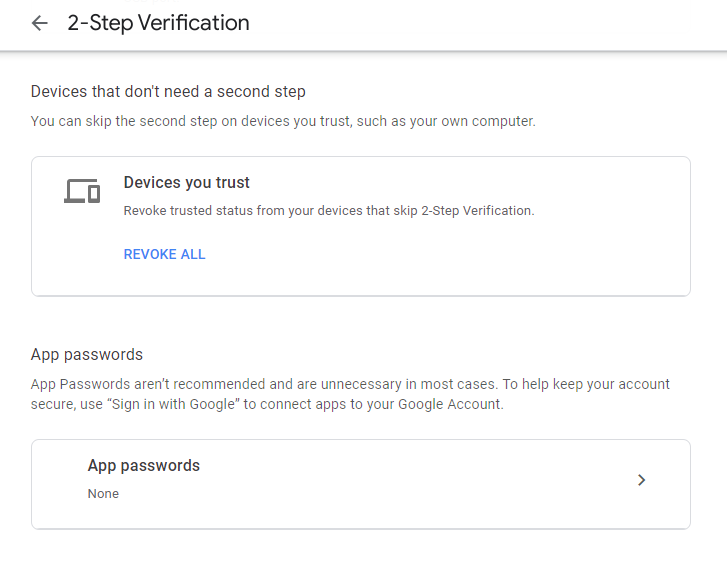
Step 4: Once you enable the 2-Step Verification you need to generate an app password which will under 2-Step Verification now.
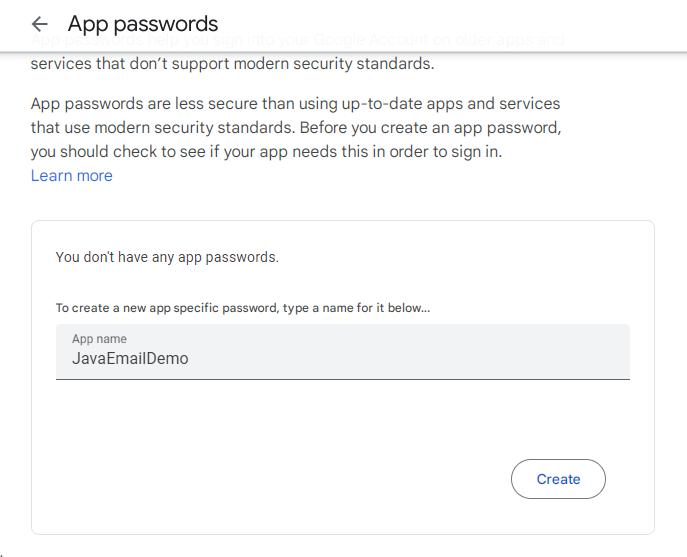
Step 5: In the App password write something like "JavaEmailDemo" and hit the create button it will generate the 16-character password.
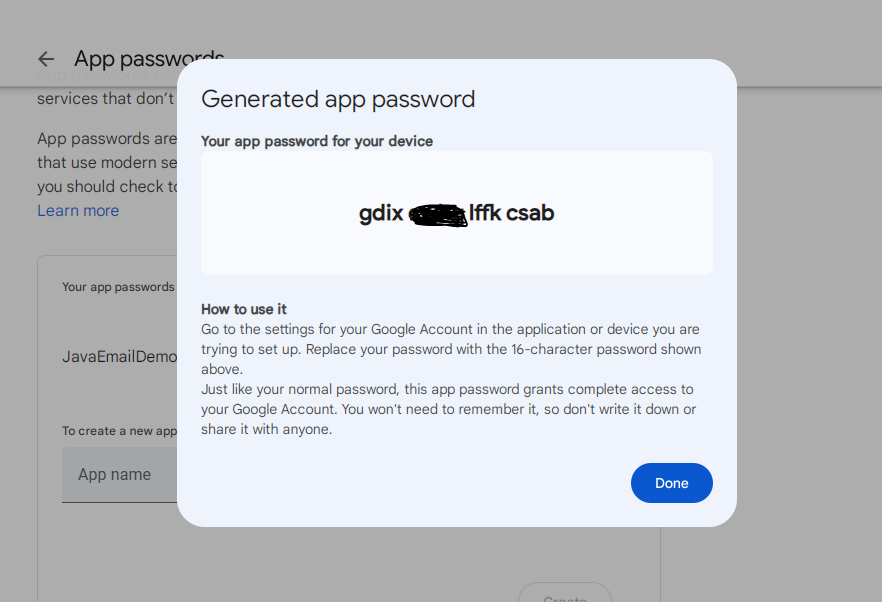
Step 6: Copy the generated app password and save it somewhere because we will be using this in our code instead of our own password(password which is created during registration of the account).
Now we are good to go for coding I will be writing code in the Maven project naming it "JavaMailAPI". Now add jakarta.mail dependency in pom.xml file
    <dependency>
            <groupId>com.sun.mail</groupId>
            <artifactId>jakarta.mail</artifactId>
            <version>2.0.1</version>
    </dependency>
Send a simple text in an email:
First, let's see a simple code of how to send a simple text message in the email through Java code. Instead of text, you can send an OTP i.e. randomly generated.
import java.util.Properties;
import jakarta.mail.Authenticator;
import jakarta.mail.Message;
import jakarta.mail.PasswordAuthentication;
import jakarta.mail.Session;
import jakarta.mail.Transport;
import jakarta.mail.internet.InternetAddress;
import jakarta.mail.internet.MimeMessage;

public class App {
    public static void main(String[] args) {
        //System.out.println("Preparing to send message");
        String message = "Hello Dear user this is message for security check";
        String subject = "codersArea : Confirmation";
        String to = "helloJava@gmail.com";
        String from = "dhanjitthakur@gmail.com";
        sendEmailWithText(message, subject, to, from);
    }

    private static void sendEmailWithText(String message, String subject, String to, final String from) {
        // 1. Get the System Properties
        Properties properties = System.getProperties();

        // Setting the properties value
        properties.put("mail.smtp.host", "smtp.gmail.com");
        properties.put("mail.smtp.port", "465");
        properties.put("mail.smtp.ssl.enable", "true"); // Enable the SSL(Secure Sockets Layers)
        properties.put("mail.smtp.auth", "true");// Enabling the Authentication

        Session session = Session.getInstance(properties, new Authenticator() {

            @Override
            protected PasswordAuthentication getPasswordAuthentication() {
                return new PasswordAuthentication(from, "xxxxxxxxxxxxxxxx");
               //here instead of "xxxxxxxxxxxxxxxx" --> Paste the 16-character generated password
            }
        });
        session.setDebug(true);

        MimeMessage msg = new MimeMessage(session);
        try {
            msg.setFrom(from);// Set the "From address" of mail
            msg.addRecipient(Message.RecipientType.TO, new InternetAddress(to));
          //Message RecipientType could be TO, BCC, CC
         //In new InternetAddress(to); --> here 'to' is variable contains recipent email ID

            msg.setSubject(subject);//Set the subject of the mail
            msg.setText(message); //Set the message of the mail

            //Send the message
            Transport.send(msg);
            System.out.println("Sent Success.................");
        } catch (Exception e) {
            e.printStackTrace();
        }
    }
}
The above code will run smoothly. In the above code snippet, we used the MimeMessage class to create email messages. While the Message class offers methods for message composition, it's an abstract class. That's where MimeMessage comes into play. It's a subclass of Message is commonly used for creating email messages in Java.
Send an Email with the attached file:
import java.io.File;
import java.util.Properties;

import jakarta.mail.Authenticator;
import jakarta.mail.Message;
import jakarta.mail.PasswordAuthentication;
import jakarta.mail.Session;
import jakarta.mail.Transport;
import jakarta.mail.internet.InternetAddress;
import jakarta.mail.internet.MimeBodyPart;
import jakarta.mail.internet.MimeMessage;
import jakarta.mail.internet.MimeMultipart;

public class App {
    public static void main(String[] args) {
        //System.out.println("Preparing to send message");
        String message = "Hello Dear user this is message for security check";
        String subject = "codersArea : Confirmation";
        String to = "helloJava@gmail.com";
        String from = "dhanjeetthakur@gmail.com";
        sendEmailWithAttach(message, subject, to, from);
    }
    private static void sendEmailWithAttach(String message, String subject, String to, final String from) {
        // 1. Get the System Properties
        Properties properties = System.getProperties();

        // Setting the properties value
        properties.put("mail.smtp.host", "smtp.gmail.com");
        properties.put("mail.smtp.port", "465");
        properties.put("mail.smtp.ssl.enable", "true"); // Enable the SSL(Secure Sockets Layers)
        properties.put("mail.smtp.auth", "true");// Enabling the Authentication

        Session session = Session.getInstance(properties, new Authenticator() {

            @Override
            protected PasswordAuthentication getPasswordAuthentication() {
                return new PasswordAuthentication(from, "xxuxxxxxxxxxxxxx");
            }
        });
        session.setDebug(true);

        MimeMessage m = new MimeMessage(session);
        try {
            m.setFrom(from);// Set the "From address" of mail
            m.addRecipient(Message.RecipientType.TO, new InternetAddress(to));
            m.setSubject(subject);
            //Message RecipientType could be TO, BCC, CC
         //In new InternetAddress(to); --> here 'to' is variable contains recipent email ID

            // attachment
            MimeMultipart mimeMultipart = new MimeMultipart();

            MimeBodyPart textMime = new MimeBodyPart();// this is to hold txt msg

            MimeBodyPart fileMime = new MimeBodyPart();// this is to hold file for email
            try {
                textMime.setText(message);
                //File pointing the file
                File f = new File("C:\\Users\\Desktop\\Example.JPG");
                fileMime.attachFile(f);
                mimeMultipart.addBodyPart(fileMime);
                mimeMultipart.addBodyPart(textMime);
            } catch (Exception e) {
                e.printStackTrace();
            }

            m.setContent(mimeMultipart);
            //Send the message
            Transport.send(m);
            System.out.println("Sent Success.................");
        } catch (Exception e) {
            e.printStackTrace();
        }
    }
}
In the code, we use MimeMultipart and MimeBodyPart to send emails with attachments. MimeMultipart acts as a container for different parts of the email, such as the text message and the attached file. MimeBodyPart represents individual parts of the email, like text messages or attachments. By combining these components, you can create structured emails with various content, making it easy to send messages with text and attachments.
Not only sending emails through Java code but we can also read/access emails from INBOX in Java code.
Reading emails through Java Code:
To read emails we will use POP( Post Office Protocol) and the reason is SMTP (Simple Mail Transfer Protocol) is primarily used for sending emails, not for receiving or reading them. To read emails, you should use a different protocol, such as POP3 (Post Office Protocol) or IMAP (Internet Message Access Protocol).
import java.util.Properties;

import jakarta.mail.Folder;
import jakarta.mail.Message;
import jakarta.mail.MessagingException;
import jakarta.mail.NoSuchProviderException;
import jakarta.mail.Session;
import jakarta.mail.Store;

public class App {
    public static void main(String[] args) {
        //System.out.println("Preparing to send message");
        String message = "Hello Dear user this is message for security check";
        String subject = "codersArea : Confirmation";
        String from = "dhanjeetthakur@gmail.com";
        readEmails(from);
    }
    private static void readEmails(String from) {
        try {
            // create a properties filed
            Properties properties = System.getProperties();
            properties.put("mail.pop3.host", "pop.gmail.com");
            properties.put("mail.pop3.port", "995");
            properties.put("mail.pop3.starttls.enable", "true");

            Session emailSession = Session.getDefaultInstance(properties);

            //// create the POP3 store object and connect with the pop server
            Store store = emailSession.getStore("pop3s");

            // store.connect(host, user, password);
            store.connect("pop.gmail.com",from, "xxxxxxxxxxxxxxxx");

            // create the folder object and open it
            Folder emailFolder = store.getFolder("INBOX");
            System.out.println("*******************"+emailFolder.getName());
            emailFolder.open(Folder.READ_ONLY);

            // retrieve the messages from the folder in an array and print it
            Message[] messages = emailFolder.getMessages();
            System.out.println("messages.length---" + messages.length);

            for (int i = 0; i < 4; i++) {
                Message message = messages[i];
                System.out.println("---------------------------------");
                System.out.println("Email Number " + (i + 1));
                System.out.println("Subject: " + message.getSubject());
                System.out.println("From: " + message.getFrom()[0]);
                System.out.println("Text: " + message.getContent().toString());

            }

            // close the store and folder objects
            emailFolder.close(false);
            store.close();

        } catch (NoSuchProviderException e) {
            e.printStackTrace();
        } catch (MessagingException e) {
            e.printStackTrace();
        } catch (Exception e) {
            e.printStackTrace();
        }
    }
}
The above code will retrieve messages from your INBOX, but it may not necessarily return the first four emails in your INBOX. The order of messages in your INBOX can vary based on a variety of factors, such as the email server's sorting or the order in which emails were received. Not only this you can even read the emails from specific user.
Reading emails from specific users:
import java.util.Properties;

import jakarta.mail.Address;
import jakarta.mail.Folder;
import jakarta.mail.Message;
import jakarta.mail.MessagingException;
import jakarta.mail.NoSuchProviderException;
import jakarta.mail.Session;
import jakarta.mail.Store;

public class App {
    public static void main(String[] args) {
        //System.out.println("Preparing to send message");
        String message = "Hello Dear user this is message for security check";
        String subject = "codersArea : Confirmation";
        String senderEmail = "helloJava@gmail.com";
        String from = "dhanjeetthakur@gmail.com";

        readEmailsFromSender(from, senderEmail);
    }
    private static void readEmailsFromSender(String from, String senderEmail) {
        try {
            // create properties
            Properties properties = System.getProperties();
            properties.put("mail.pop3.host", "pop.gmail.com");
            properties.put("mail.pop3.port", "995");
            properties.put("mail.pop3.starttls.enable", "true");

            Session emailSession = Session.getDefaultInstance(properties);

            // create the POP3 store object and connect with the pop server
            Store store = emailSession.getStore("pop3s");

            store.connect("pop.gmail.com", from, "xxxxxxxxxxxxxxxx");

            // create the folder object and open it
            Folder emailFolder = store.getFolder("INBOX");
            emailFolder.open(Folder.READ_ONLY);

            // retrieve all messages
            Message[] messages = emailFolder.getMessages();

            // Process messages from a specific sender
            for (int i = 0; i < messages.length; i++) {
                Message message = messages[i];
                Address[] fromAddresses = message.getFrom();
                if (fromAddresses.length > 0) {
                    String senderAddress = fromAddresses[0].toString();
                    if (senderAddress.contains(senderEmail)) {
                        System.out.println("---------------------------------");
                        System.out.println("Email Number " + (i + 1));
                        System.out.println("Subject: " + message.getSubject());
                        System.out.println("From: " + senderAddress);
                        System.out.println("Text: " + message.getContent().toString());
                    }
                }
            }

            // close the store and folder objects
            emailFolder.close(false);
            store.close();

        } catch (NoSuchProviderException e) {
            e.printStackTrace();
        } catch (MessagingException e) {
            e.printStackTrace();
        } catch (Exception e) {
            e.printStackTrace();
        }
    }
}
Conclusion:
In this blog, we've explored the Java Mail API, diving into its fundamentals and practical applications. We've covered essential protocols like SMTP, MIME, and POP, and even walked through setting up your Google account for secure email communication.
From sending simple text emails to sending emails with attachments, you'll find step-by-step guidance and code examples. Plus, we've delved into reading emails via Java code, and we've shown you how to filter and read emails from specific senders.
This blog gives you enough knowledge to add email feature into your Java applications, making it easier to send, receive and manage emails with ease. If you find this blog helpful then please give it a like and feel free to suggest anything you want in the comment section. Your support means a lot to me and it inspires me to write blogs like this. You can also subscribe for regular updates or you can even follow me on Twitter(@DhanjeetKumar0) and LinkedIn (Dhanjeet Thakur) for more great content.